AI has gone from “someday maybe” to something millions of people use every single day. In 2025, you’re probably using AI tools yourself—whether you realize it or not—for work, creative projects, or just figuring stuff out. This guide walks through what actually works and what’s worth your time.
What Are AI Tools?
AI tools are software programs that do things traditionally requiring human intelligence: writing, creating images, writing code, analyzing data, automating tedious tasks. The key difference from regular software is that these tools learn from data and get better over time—not through programming updates, but through experience.
The market has exploded. The global AI software market is expected to hit $400 billion this year. What surprised most people is how accessible these tools have become. You don’t need a computer science degree. You don’t need to install anything. Many of the best tools run right in your browser.
Categories of AI Tools
Writing and Content Creation
This is where most people start. AI writing tools help with articles, emails, marketing copy, creative writing—the list goes on. The better ones understand context: they get your tone, your style, and what you’re trying to accomplish.
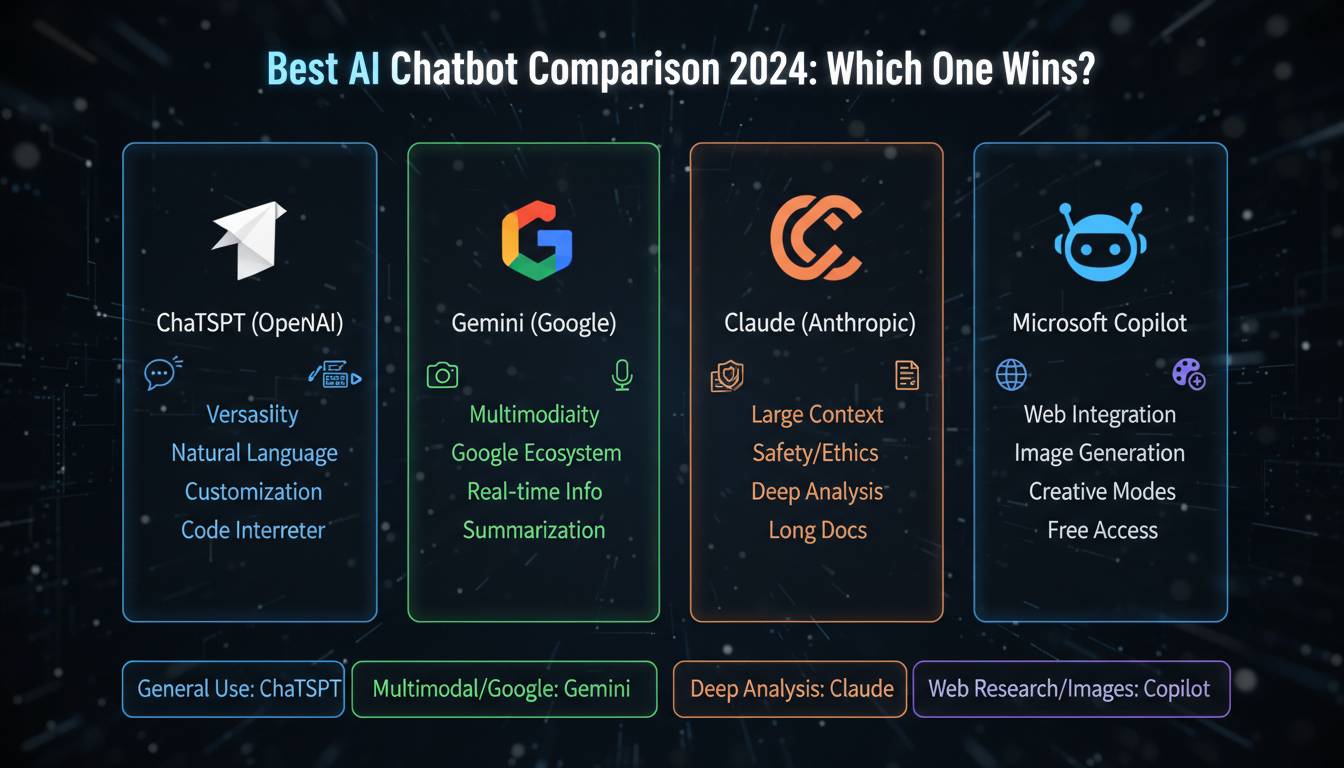
The big names here are Claude (from Anthropic, focused on being helpful and safe), ChatGPT (from OpenAI, the one most people have tried), and Google Gemini (plays nice with Google’s other services). All three can draft documents, suggest edits, and help you push past writer’s block. They each have free tiers, so you can test drive them before committing.
Image Generation
Image AI has come a long way in a short time. DALL-E 3, Midjourney, and Adobe Firefly let you create detailed images from plain text descriptions. Designers use them. Marketers use them. A lot of regular people use them too, just for fun or side projects.
You describe what you want—”a vintage travel poster for a coffee shop, warm colors, art deco style”—and the tool generates it. You can specify styles, change colors, tweak compositions. Advanced features let you edit specific parts of an image or enhance resolution.
Coding Assistants
If you write code for a living, AI assistants have become practically essential. GitHub Copilot and Amazon CodeWhisperer autocomplete your code, suggest functions, and help you find bugs. They look at your entire project, not just the file you’re working on, so their suggestions actually fit what you’re building.
Research shows developers with AI assistants finish significantly faster without sacrificing code quality. They learned from millions of open-source projects, so they’ve seen most common programming problems before.
Video and Audio
Video tools have gotten much more capable. You can auto-edit footage, generate voiceovers from text, create subtitles, and even present through virtual avatars. For YouTubers or anyone producing regular video content, these tools cut production time dramatically.
On the audio side, you can clone voices, generate music, edit podcasts automatically, remove background noise, and create human-sounding narration in dozens of languages.
How to Pick What Works for You
Don’t just grab the most popular tool. Think about what you actually need.
What are you trying to do? A writer needs different features than a developer or someone automating customer service. Most tools are generalists, but some specialize.
What’s your budget? Free tiers exist for almost everything. They’re usually enough to learn whether a tool works for you. Paid plans give you more runs, faster processing, and fancier features.
How do they handle your data? This matters more than most people think. Some tools use your inputs to improve their models—meaning your data might train future versions. If you’re working with anything sensitive, read the privacy policy. Look for options to opt out of data processing.
Do they play nice with your existing software? The best tool in the world is useless if it doesn’t connect to what you already use. Check if it integrates with Google Workspace, Microsoft Office, or whatever industry-specific tools you rely on.
Getting Started
Pick one tool and stick with it for a bit. Don’t try to learn everything at once. Most tools have solid tutorials and help docs—use them.
Start small. Have an AI writing tool help you draft an email. Try generating an image with a simple prompt. See what happens when you ask it to revise something you wrote. You’ll figure out how to phrase requests to get better results—that’s a skill that transfers across tools.
One thing worth remembering: these tools augment human creativity. They don’t replace it. The best results come from combining AI capability with human judgment, creativity, and oversight. AI handles the heavy lifting; you provide the vision.
Where Things Are Heading
The landscape keeps shifting. A few trends are worth watching:
More specialization. Instead of one tool doing everything, expect more tools built for specific industries and use cases. That’s already happening in healthcare, legal, and finance.
Multimodal everything. The next generation handles text, images, audio, and video in a single interface. You won’t need three different tools for a project that involves all four.
Fewer hallucinations. Early AI confidently told you things that were completely wrong. Newer versions are better at checking facts and admitting when they’re unsure. It’s not perfect, but it’s improved.
Wrapping Up
AI tools have moved past the hype cycle into genuinely useful territory. Whether you’re an individual freelancer or running a company, there’s probably something that can make your life easier right now.
The trick is picking the right tool for what you actually need, understanding what it does well (and what it doesn’t), and integrating it into your workflow without over-relying on it. The tools keep getting better. Staying aware of what’s new helps you take advantage without getting overwhelmed.
Frequently Asked Questions
What’s the best AI tool for beginners?
ChatGPT and Claude are the easiest to jump into. Both have free versions, good documentation, and interfaces that don’t require a manual. Try one, mess around with it, see if it clicks for you.
Are there free options that are actually good?
Yes. ChatGPT, Claude, and Gemini all have solid free tiers. For images, Bing Image Creator and Leonardo.ai give you complimentary credits. The paid versions are nice to have, but you can get real value without spending money.
What about business use?
If you’re using these for work, look at enterprise plans from OpenAI, Anthropic, and Microsoft Azure. They offer stronger security, team features, and API access. Make sure they fit with your existing software stack first.
Should I worry about privacy?
Read the terms. Some tools process your inputs to improve their models—your prompts might train future versions. If you’re entering anything confidential, check whether you can disable that. Enterprise plans usually have better data protection. Some tools process data without storing it.
Will AI replace my job?
AI automates a lot of routine stuff and makes certain tasks faster, but it doesn’t replace human judgment, creativity, or the ability to work with other humans. The sweet spot is using AI for the grunt work while you focus on the parts that actually need a person.
How often do these tools change?
Often. Some providers push updates monthly or even weekly. New features, performance improvements, and bug fixes come constantly. Check the update notes for your tools—they usually announce what’s new.