The AI revolution in workplace productivity hit its stride in 2024. With competition intensifying across every sector, AI-powered tools have moved from novelty to necessity—helping professionals crank out more work while ditching the repetitive stuff that eats up your day. The market has exploded: hundreds of apps now compete for attention, from writing assistants to workflow automation.
This guide breaks down the most useful AI productivity tools of 2024—what they do, what they cost, and how they actually perform in the real world.
The State of AI Productivity in 2024
The AI productivity market has changed dramatically over the past year. What started as basic text generation has evolved into systems that can analyze complex data, automate multi-step processes, and even anticipate what you need before you ask. Analysts project the global market will reach $68 billion by the end of the year—businesses are desperate for any edge they can get.
A few things accelerated this growth. First, large language models got much better at understanding context—they’re not just responding to commands anymore, they actually get what you’re asking. Second, integration improved: AI tools now connect with existing software instead of operating in isolation. Third, pricing dropped—many tools have free tiers, so individuals and small teams can test them before paying.
Research from Stanford found that professionals using AI tools complete tasks about 40% faster than those relying on traditional methods. Maybe more interestingly, these tools seem to democratize expertise—junior team members can produce work that previously would’ve required someone much more senior.
Best Overall AI Productivity Tools
Looking at versatility, ease of use, pricing, and effectiveness, a few tools stand out as solid all-around picks.
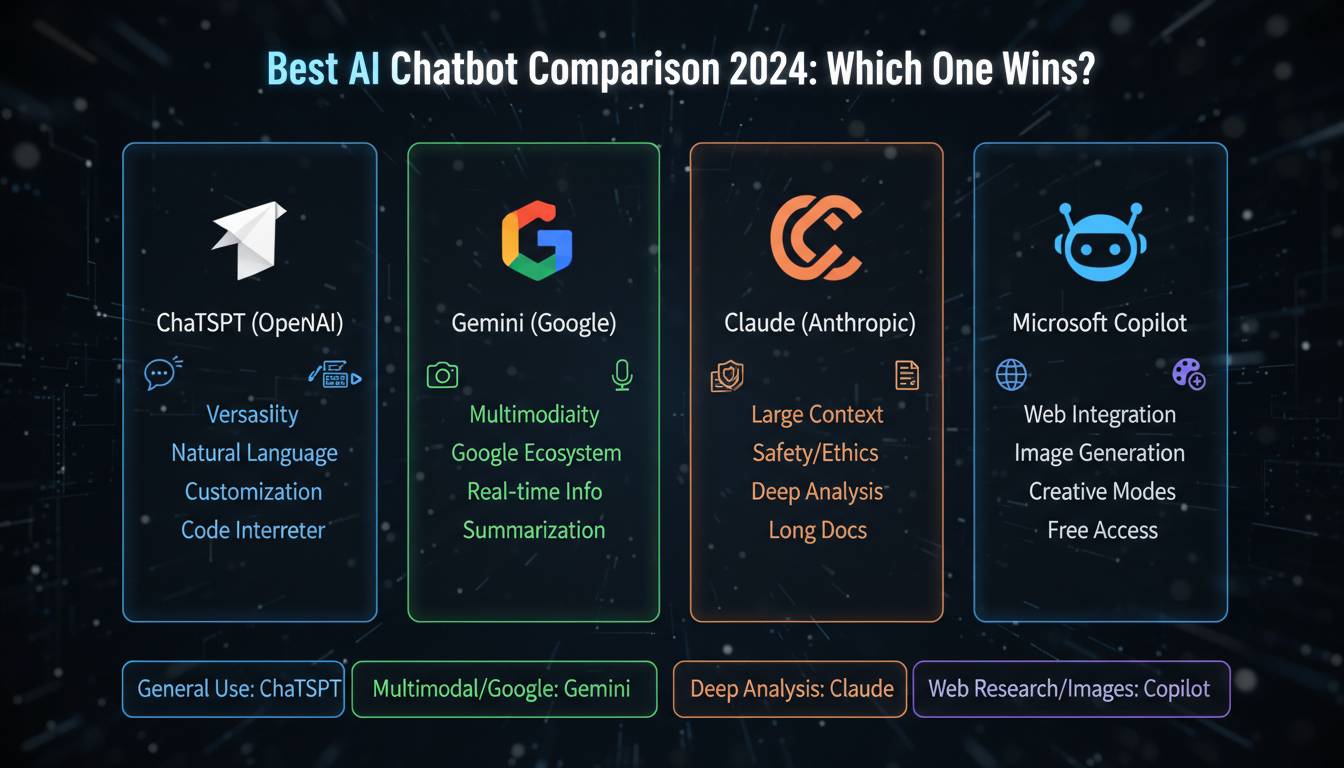
ChatGPT is still the biggest name in conversational AI. GPT-4 handles drafting, answering questions, and brainstorming with impressive reasoning and broad knowledge. OpenAI keeps updating it, so it’s now reliable enough for professional use—customer service automation, content development, you name it.
Microsoft Copilot became a real contender by baking AI directly into Word, Excel, PowerPoint, and Outlook. If you’re already in the Microsoft ecosystem, you get AI help without learning new tools or switching between apps. The enterprise security and management features make it a solid choice for bigger teams.
Google Gemini (formerly Bard) shines at research and information synthesis. It pulls from Google’s search infrastructure to give you current, well-sourced answers. The ability to analyze multiple documents at once and pull out key insights makes it worth considering if you do a lot of market research or need to digest large amounts of information.
Best AI Tools for Writing and Content Creation
Writing tools have come a long way—they can now produce publication-quality content in just about any format.
Jasper AI targets marketing and content teams with templates for blog posts, social media, ads, and email campaigns. Brand voice customization helps keep generated content consistent, and collaboration features support team workflows.
Grammarly moved way beyond grammar checking. Its AI now handles clarity, engagement, tone, and even plagiarism detection. Real-time assistance works in browsers, email, and word processors—pretty much anywhere you write.
Notion AI brings AI into note-taking and documentation. Generate meeting notes instantly, summarize long documents, or turn rough ideas into structured content. Because it understands what you’re working on within your Notion workspace, its suggestions tend to be more relevant than standalone writing tools.
Best AI Tools for Automation and Workflow
Automation is where AI delivers serious ROI—eliminate the repetitive stuff and focus on work that actually matters.
Zapier leads the no-code automation space, connecting over 5,000 apps through visual workflow builders. AI features include smart routing, automatic field mapping, and natural language interfaces for building automations without technical skills.
Microsoft Power Automate offers enterprise workflow automation with deep Microsoft integration. AI Builder handles intelligent document processing, predictive modeling, and automated decisions based on your business rules.
Make (formerly Integromat) provides visual workflow automation with solid conditional logic and data transformation. AI features include automatic scenario optimization and intelligent error handling that keeps complex integrations running without constant maintenance.
Best Free AI Productivity Tools
Several quality options deliver real value without costing anything.
ChatGPT’s free tier gives you GPT-3.5, which still handles most common tasks—email drafting, basic research, content ideas. GPT-4 is better, but the free version works fine for plenty of professional needs.
Canva’s AI features are surprisingly comprehensive. Magic Design, Magic Write, and image generation are all free. The interface is intuitive, so you don’t need design skills to make something look good.
Google Workspace’s AI features increasingly come with free personal accounts—smart composition in Gmail, summarization in Docs, image generation for presentations. Enterprise features need paid plans, but the free stuff covers basics.
Pricing Comparison and Value Considerations
AI tools mostly use tiered subscription models: free to around $50/month for individual plans, with enterprise deployments running significantly higher when you need advanced security and management.
But value isn’t just about price. Consider total cost of ownership—implementation time, training, ongoing maintenance. Sometimes a pricier tool saves money long-term through better integration, meaning less time wrestling with disconnected systems.
Future Outlook: Where AI Productivity Is Heading
AI productivity tools will keep getting smarter and more integrated. Future versions will learn your working style and preferences to provide more relevant help. Multimodal capabilities—combining text, image, and voice in single apps—will reduce friction between idea and creation.
Within a few years, AI assistants will handle much more routine decision-making, freeing professionals for creative and strategic work that needs human judgment. Organizations that figure out how to adopt AI thoughtfully now will have a real advantage as capabilities advance.
Conclusion
The AI productivity landscape in 2024 offers real opportunities to work smarter. From platforms like Microsoft Copilot to specialized solutions for specific workflows, there’s something for nearly every knowledge worker’s needs. Success comes from picking tools that match your actual workflows, existing tech, and budget—and committing to learning how to collaborate with AI effectively. Those who master these tools will find themselves more productive, more creative, and more competitive.
Frequently Asked Questions
What’s the best AI tool for productivity in 2024?
Depends on your needs, but Microsoft Copilot and ChatGPT are strong general picks. Copilot wins if you’re deep in Microsoft’s ecosystem. ChatGPT offers more flexibility across different apps.
Are AI productivity tools worth it?
For most people, yes. Research shows 25-40% productivity gains for typical tasks—the biggest wins come in writing, research, and synthesizing information. Pick tools that fit your actual work rather than chasing the latest shiny thing.
What’s the best free AI productivity tool?
ChatGPT’s free tier is the most capable at no cost—it handles everything from writing help to research. Canva’s free AI features are great for design work. Google Workspace users also get solid free AI in Docs and Gmail.
How do AI tools improve productivity?
They automate repetitive tasks, give you instant access to information, help create content faster, reduce errors, and speed up decision-making. By handling the routine stuff, they free you up for creative and strategic work that needs a human touch.
Which AI productivity tool is best for teams?
Microsoft Copilot and Zapier offer the best collaboration, integration, and admin controls. Copilot fits naturally into existing Microsoft workflows; Zapier excels at connecting different apps and automating cross-platform processes.
Can AI productivity tools replace human workers?
No—they augment rather than replace. AI handles routine tasks and information processing well, but lacks the creativity, emotional intelligence, and complex judgment needed for many jobs. The smartest approach treats AI as a powerful assistant that makes you more effective, not a replacement for human expertise.