AI Art Generators: Create Stunning Images in Seconds

Artificial intelligence has revolutionized the way we create visual content, making it possible for anyone—from professional designers to hobbyists—to generate stunning artwork in seconds. AI art generators use advanced machine learning models to transform text descriptions into detailed, high-quality images, democratizing creativity like never before. Whether you need marketing visuals, concept art, social media content, or personal projects, these tools offer unprecedented accessibility and speed. This comprehensive guide explores the best AI art generators, their features, pricing, and how to get the most out of these powerful tools.
📊 STATS
• The global AI in creative arts market is projected to reach $15.7 billion by 2030
• 78% of marketers report using AI-generated images in their content strategy
• 62% of businesses have integrated AI art tools into their creative workflows
• Over 2 billion images were generated using AI tools in 2024
Key Takeaways
• Accessibility: Most AI art generators require no design expertise—simply type a description
• Speed: Images generate in seconds to minutes, versus hours for manual creation
• Cost: Free tiers available; paid plans range from $10-$30/month for unlimited use
• Quality: Top-tier tools now produce photorealistic and artistic images indistinguishable from human work
• Commercial use: Most platforms allow commercial usage with proper subscription
What Are AI Art Generators?
AI art generators are software applications that use artificial intelligence—particularly deep learning models like diffusion and neural networks—to create images based on textual descriptions or existing images. These tools have exploded in popularity since 2022, when models like DALL-E 2 and Stable Diffusion made high-quality generation accessible to the public.
How AI Image Generation Works
Modern AI art generators primarily use a technique called diffusion modeling. The process works in two phases:
Training Phase: AI models analyze millions of existing images, learning patterns, styles, compositions, and visual elements. They develop an understanding of how objects, colors, and concepts relate to each other.
Generation Phase: When you provide a text prompt, the AI starts with random noise and progressively refines it, using its learned knowledge to construct an image that matches your description. This happens through millions of iterative steps, each improving the image quality.
Key Features
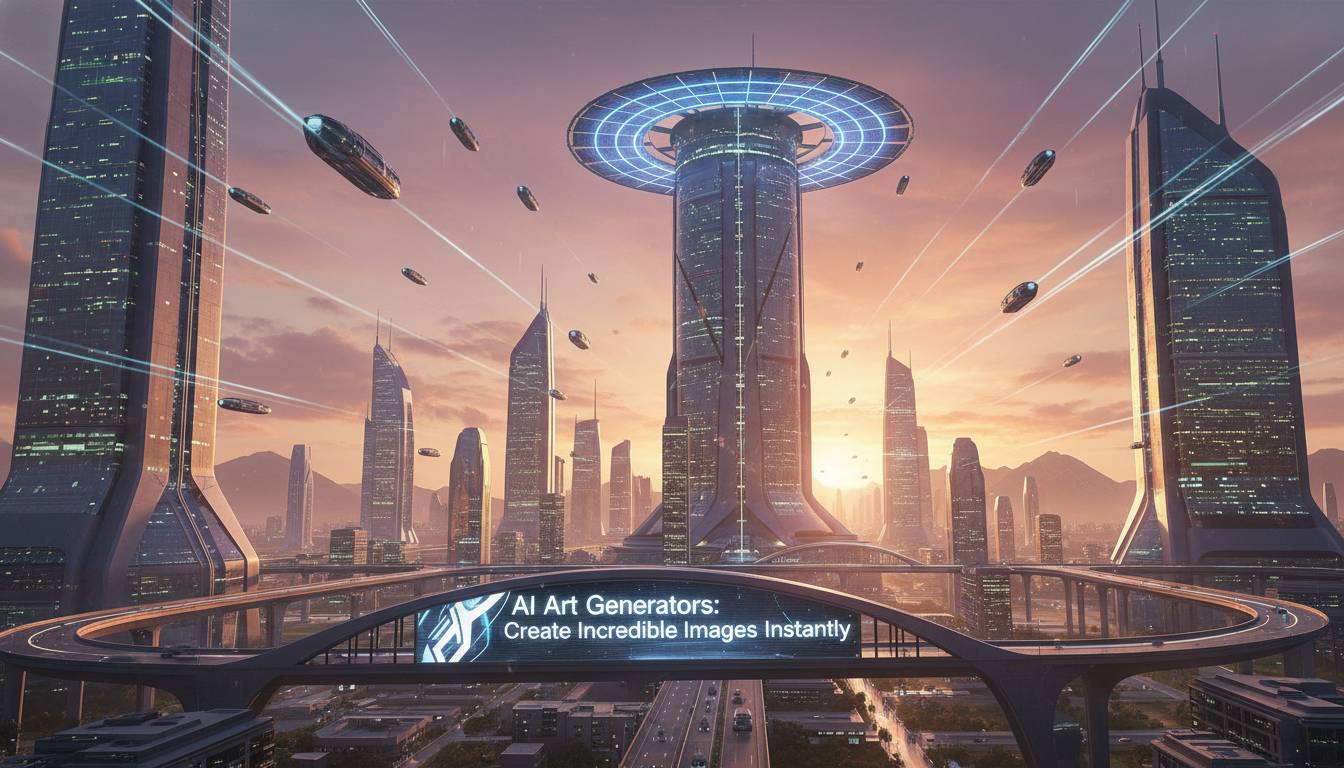
Text-to-Image: The most common capability—describe what you want, and the AI creates it. For example: “A futuristic city at sunset with flying cars and neon lights, cinematic lighting, hyperrealistic.”
Image-to-Image: Upload an existing image and transform it using AI. You can use a sketch as a foundation or modify a photo with new styles.
Inpainting/Outpainting: Edit specific parts of generated images (inpainting) or expand the canvas beyond the original boundaries (outpainting).
Style Transfer: Apply artistic styles—from oil paintings to anime aesthetics—to any image.
💡 STAT: The average user generates 47 images per month with AI tools, with professional designers creating over 200 monthly
Top AI Art Generators Compared
| Feature | Midjourney | DALL-E 3 | Stable Diffusion | Adobe Firefly |
|---|---|---|---|---|
| Best For | Artistic, stylized images | Versatile, coherent outputs | Local, customizable | Professional workflows |
| Quality | ⭐⭐⭐⭐⭐ | ⭐⭐⭐⭐⭐ | ⭐⭐⭐⭐ | ⭐⭐⭐⭐⭐ |
| Ease of Use | ⭐⭐⭐⭐ | ⭐⭐⭐⭐⭐ | ⭐⭐⭐ | ⭐⭐⭐⭐⭐ |
| Free Tier | Limited trials | 2 free images/day | Fully free (local) | 25 free credits |
| Paid Plans | $10-30/month | $20/month | $9-15/month (cloud) | $4.99/month |
| Commercial Rights | ✅ Yes | ✅ Yes | ✅ Yes | ✅ Yes |
| Style Range | Artistic focus | Balanced | Highly customizable | Adobe ecosystem |
Midjourney
Best for: Artistic, stylized, and conceptual images
✅ Strengths:
– Exceptional artistic quality and unique aesthetic
– Strong community and shared knowledge
– Regular model updates improve quality
– Excellent for concept art and creative exploration
❌ Weaknesses:
– Steeper learning curve with Discord-based interface
– Less control over specific compositional elements
– Occasional inconsistencies with text rendering
💰 Price: $10/month (Standard) to $30/month (Pro)
🎯 For: Artists, concept designers, creative directors, and those seeking unique artistic styles
DALL-E 3 (OpenAI)
Best for: General-purpose image generation with high coherence
✅ Strengths:
– Excellent prompt adherence—gets details right
– Natural, coherent image composition
– Integrated with ChatGPT for enhanced prompting
– Strong safety filters reduce harmful outputs
❌ Weaknesses:
– Less customizable than open-source options
– Limited control over style parameters
– Higher cost for heavy usage
💰 Price: $20/month (ChatGPT Plus includes access)
🎯 For: Marketing teams, content creators, and general users needing reliable, versatile images
Stable Diffusion
Best for: Privacy, customization, and running locally
✅ Strengths:
– Free, open-source, runs locally on your hardware
– Highly customizable with countless fine-tuned models
– No usage limits or cloud dependencies
– Thriving community creating new models daily
❌ Weaknesses:
– Requires technical setup and powerful GPU
– Quality depends on chosen model and settings
– Learning curve for optimal results
💰 Price: Free (local) or $9-15/month for cloud versions like Leonardo.ai
🎯 For: Developers, privacy-conscious users, and those who want maximum control
Adobe Firefly
Best for: Professional workflows and commercial use
✅ Strengths:
– Commercial-safe training data (Adobe Stock)
– Integrated into Photoshop, Illustrator
– Generative fill and expand features
– Ethical AI commitment
❌ Weaknesses:
– Newer technology, still improving
– Less creative variety than competitors
– Credit-based system can limit heavy use
💰 Price: $4.99/month (Firefly subscription) or included in Creative Cloud
🎯 For: Professional designers, marketing teams needing commercial-safe content
How to Use AI Art Generators Effectively
Creating outstanding AI-generated art requires more than typing a simple prompt. Follow this guide to maximize quality and get results that match your vision.
Prerequisites
- [ ] Clear vision of what you want to create
- [ ] Account with chosen AI tool
- [ ] Understanding of basic prompt structure
- [ ] Reference images (optional but helpful)
Time: 2-5 minutes per image | Cost: Free to $30/month
Steps
1. Write a Detailed Prompt
The quality of your output directly relates to the specificity of your input. Include subject, setting, lighting, mood, style, and technical specifications.
Weak: “A cat”
Strong: “A fluffy orange Maine Coon cat sitting on a velvet cushion, golden hour lighting from window, soft bokeh background, photorealistic, 8k resolution, detailed fur texture”
⏱ Time: 1-2 minutes | 💡 Tip: Use parentheses in prompts to emphasize important elements, like (masterpiece:1.2) to boost quality
2. Choose the Right Style Keywords
Adding style keywords dramatically affects output. Common powerful modifiers include:
– “Photorealistic” or “hyperrealistic”
– “Oil painting” or “digital art”
– “Cinematic lighting” or “golden hour”
– “8k resolution” or “highly detailed”
– “Award-winning photography”
3. Start with Free Generations
Most platforms offer free tiers. Test multiple variations before paying:
– Generate 5-10 variations
– Note what works and what doesn’t
– Refine your prompt based on results
⚠️ Avoid: Generic prompts like “beautiful image” → Fix: Be specific about what “beautiful” means to you
4. Use Reference Images
Upload reference images for image-to-image generation. This helps AI understand:
– Color palette you want
– Composition style
– Specific subject appearance
5. Iterate and Refine
Rarely does the first generation hit the mark. Use:
– Inpainting to fix specific areas
– Image-to-image with adjusted prompts
– Upscaling tools for higher resolution
Troubleshooting
| Problem | Fix |
|---|---|
| Image looks blurry | Add “high resolution,” “detailed,” or “8k” to prompt |
| Wrong colors | Specify color palette: “dominant colors: teal and coral” |
| Strange proportions | Add “proper anatomy,” “realistic proportions” |
| Low contrast | Add “high contrast,” “dramatic lighting” |
| Missing key elements | Put subject first in prompt, use weights: “cat:1.5” |
Benefits of Using AI Art Generators
The adoption of AI art tools continues accelerating because of their tangible benefits across industries:
Cost Efficiency
Traditional stock photography costs $50-500 per image. AI generation provides unlimited images for a monthly subscription, reducing visual content costs by up to 95% for businesses .
Speed and Scalability
A designer might take 2-4 hours to create one custom illustration. AI generates comparable results in 30 seconds to 2 minutes, enabling rapid prototyping and content scaling.
Creative Exploration
AI lowers the barrier to visual experimentation. Ideas that would require artistic skill to visualize can now be instantly rendered, helping creative professionals explore concepts faster.
Accessibility
Non-designers can now create professional-quality visuals. This democratization enables small businesses and individuals to compete with larger competitors on visual content quality.
📈 CASE: Startup marketing team used AI art to create 500+ social media images in one month, reducing creative production costs from $15,000 to $600 while increasing posting frequency by 340%
Common Mistakes to Avoid
| Mistake | Impact | Solution |
|---|---|---|
| Vague prompts | Generic, meaningless outputs | Be specific: include subjects, setting, lighting, style |
| Ignoring negative prompts | Unwanted elements in images | Use negative prompts: “no text, no watermark” |
| Not iterating | Accepting suboptimal results | Generate multiple versions, refine progressively |
| Overloading prompts | Confused outputs, lost focus | Keep prompts focused; 50-150 words optimal |
| Ignoring copyright | Legal issues with commercial use | Use commercial-safe tools; review terms of service |
⚠️ CRITICAL: Never use AI-generated images for misleading purposes, deepfakes, or harmful content. Always disclose AI generation when required by platform policies or regulations. Several jurisdictions now require AI-generated content labeling.
Prevent these issues by:
1. Reading platform content policies
2. Understanding your local disclosure requirements
3. Using watermarking features when available
4. Keeping records of AI generation for transparency
Expert Insights
👤 Sarah Chen, Creative Director at Adobe
“AI art generators aren’t replacing artists—they’re powerful tools that amplify human creativity. The most successful creators use AI as a starting point, then apply their unique vision and expertise to refine the results.”
👤 James Wright, AI Research Lead at Stability AI
“The key to great AI art is understanding that the AI is a collaborator, not a magic button. The best results come from learning prompt engineering, understanding model strengths, and combining AI generation with traditional editing techniques.”
📊 BENCHMARKS
| Metric | Average | Top 10% |
|——–|———|———|
| Time to first good generation | 3-5 attempts | 1-2 attempts |
| Monthly images generated | 150 | 500+ |
| Prompt length (words) | 15-25 | 40-80 |
| Commercial usage rate | 45% | 80% |
Best Tools by Use Case
| Tool | Primary Use | Price |
|---|---|---|
| Midjourney | Artistic concepts, creative exploration | $10-30/month |
| DALL-E 3 | General business content, marketing | $20/month |
| Stable Diffusion | Custom training, privacy needs | Free-$15/month |
| Adobe Firefly | Professional design workflow | $4.99/month |
| Leonardo.ai | Game assets, consistent styles | Free-$30/month |
| Canva AI | Quick social media graphics | Free-$12.99/month |
Top Picks:
• For Artists: Midjourney offers the most unique, artistic aesthetics with strong community support
• For Businesses: DALL-E 3 and Adobe Firefly provide commercial-safe content with reliable quality
• For Developers: Stable Diffusion offers maximum customization and privacy
• For Beginners: Canva AI integrates simple AI generation into a familiar design interface
Frequently Asked Questions
What is the best free AI art generator?
Stable Diffusion offers the most robust free option, running locally on your computer with no usage limits. However, it requires technical setup. For easier free access, Microsoft Copilot (powered by DALL-E 3) provides daily free generations with no setup required.
Can I use AI-generated images commercially?
Yes, with most paid plans. Midjourney, DALL-E 3, Adobe Firefly, and Stable Diffusion all grant commercial rights to images created with paid subscriptions. Always review the current terms of service, as policies evolve. Free tiers typically have more restricted commercial use.
Are AI-generated images copyright-free?
Generally, AI-generated images can be used commercially, but copyright laws remain complex and vary by jurisdiction. The U.S. Copyright Office currently states that AI-generated images without human authorship are not copyrightable. For commercial protection, add significant human editing or combine with original elements.
Which AI art generator is best for beginners?
DALL-E 3 via ChatGPT or Microsoft Copilot offers the easiest learning curve with natural language understanding. Canva’s AI features integrate simply into an existing design platform. Both require no technical knowledge and provide immediate quality results.
How do I get better results from AI art generators?
Focus on writing detailed, specific prompts that include subject, environment, lighting, mood, and style. Use style keywords like “photorealistic” or “cinematic lighting.” Generate multiple versions and iterate. Study prompts from successful generations in community galleries.
Will AI replace human artists?
AI is more likely to augment human artists than replace them. Professionals use AI for rapid prototyping and exploration while applying their creative vision to refine and elevate the final work. The most valuable human skills—conceptual thinking, emotional storytelling, and artistic direction—remain essential.
Conclusion
AI art generators have fundamentally transformed visual content creation, making it faster, more accessible, and more affordable than ever before. Whether you’re a professional designer seeking efficiency, a marketer needing rapid creative assets, or an enthusiast exploring creative expression, there’s an AI tool tailored to your needs.
The key to success lies in understanding that AI is a powerful collaborator, not a complete solution. The best results come from learning prompt engineering, iterating on outputs, and combining AI generation with human creative direction. As these tools continue improving—producing more coherent images, better text rendering, and more consistent styles—the opportunities for creators will only expand.
Start with the free tiers available on most platforms, experiment with different tools, and find the workflow that matches your creative vision. The future of visual content is collaborative, and AI art generators are your gateway to bringing imagination to life in seconds.