Portable Laptop Stands for Remote Work – Work Comfortably Anywhere

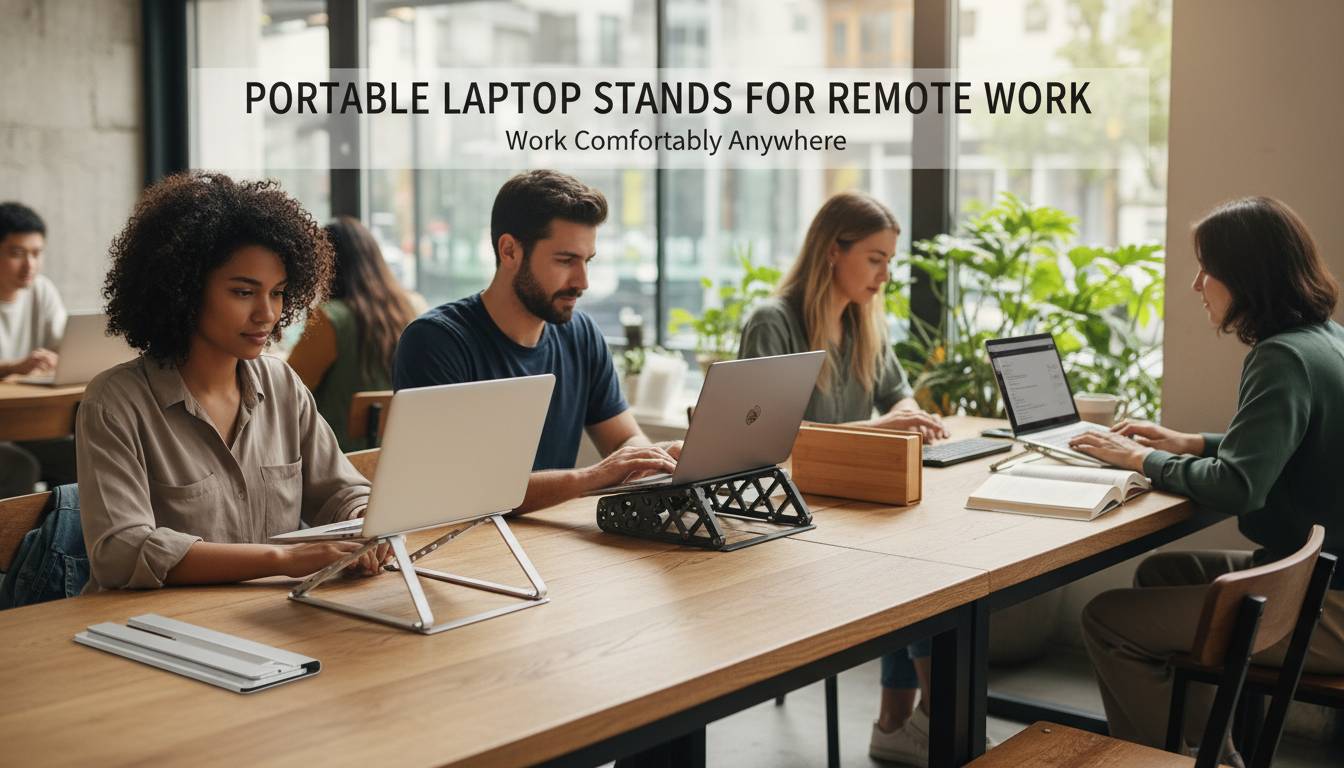
Working remotely offers freedom and flexibility, but it also brings unique challenges—especially when it comes to maintaining proper posture and preventing strain during long work sessions. A portable laptop stand transforms any space into an ergonomic workstation, elevating your device to eye level and reducing the physical toll of hours spent typing. Whether you’re a digital nomad bouncing between coffee shops, a remote employee setting up in co-working spaces, or someone who simply wants better posture while working from home, the right laptop stand can dramatically improve your comfort and productivity.
This comprehensive guide explores everything you need to know about portable laptop stands for remote work, from understanding the health benefits to choosing the perfect stand for your specific needs and workflow.
Why Remote Workers Need a Portable Laptop Stand
The average remote worker spends 6-8 hours per day at their computer, often in suboptimal setups that lead to chronic discomfort. Traditional laptop design places the screen at a downward angle, forcing users to hunch forward and strain their neck. Over time, this poor posture contributes to neck pain, shoulder tension, back problems, and repetitive strain injuries. Research from the American Chiropractic Association indicates that for every inch the head tilts forward, it adds approximately 10 pounds of effective weight that the neck muscles must support.
A portable laptop stand addresses these issues by elevating your screen to eye level, encouraging a neutral spine position. This simple adjustment reduces neck strain by up to 40% compared to working without a stand, according to occupational health studies. Beyond posture correction, laptop stands improve airflow around your device, preventing overheating during intensive work sessions—particularly important when running multiple applications or participating in video calls.
For remote workers specifically, the portability factor cannot be overstated. Unlike traditional desk-mounted solutions, portable laptop stands travel with you, ensuring consistent ergonomic support whether you’re working from a kitchen table, hotel room, airport lounge, or outdoor workspace. This consistency builds healthy habits that translate into long-term physical wellbeing.
Types of Portable Laptop Stands
Understanding the different designs available helps you match a stand to your work style and priorities. Each type offers distinct advantages and trade-offs that impact portability, stability, adjustability, and price.
Foldable and Collapsible Stands
Foldable stands collapse flat for easy transport, typically sliding into laptop sleeves or backpacks without adding significant bulk. These stands usually feature aluminum or ABS plastic construction with hinged mechanisms that lock into position when unfolded. The trade-off involves slightly less height adjustability compared to more complex designs, though many foldable options offer two or three angle settings to accommodate different seating positions.
Adjustable Height Stands
These stands feature telescoping legs or articulated arms that provide continuous height adjustment. You can raise or lower the platform to achieve precise eye-level positioning regardless of your seating arrangement. While slightly bulkier than basic foldable options, height-adjustable stands deliver the most customizable ergonomic experience. Look for models with sturdy locking mechanisms that prevent wobbling during typing.
Magnetic and Clip-On Stands
Magnetic stands attach directly to laptop magnetically (compatible with specific MacBook models) or use clips that grip the device’s edges. These ultra-lightweight options add minimal weight to your carry load but may limit screen opening angles and can affect cooling depending on placement. They’re ideal for minimalists who want minimal intrusion into their workflow.
Standing Desk Converter Stands
For remote workers who alternate between sitting and standing, converter-style stands transform from a flat platform to an angled standing position. These larger stands sacrifice some portability for versatility, making them better suited for workers who establish semi-permanent stations rather than frequent relocation.
Key Features to Evaluate
Selecting the right portable laptop stand requires balancing multiple factors based on your specific situation. Consider these essential features before making a purchase decision.
Weight and Dimensions: Since you’ll be carrying your stand daily, weight matters significantly. Most quality portable stands weigh between 0.5-2 pounds. Measure your typical bag’s compartments to ensure your chosen stand fits comfortably alongside your laptop and other essentials.
Height and Angle Adjustability: The ideal stand raises your screen to eye level when you’re seated comfortably. Look for stands offering at least 4-6 inches of height variation. Some stands also provide tilt adjustments to fine-tune your viewing angle.
Stability and Build Quality: A wobbly stand frustrates users and risks dropping expensive equipment. Examine the base width, material quality, and customer reviews regarding stability during use. Aluminum bases generally provide better stability than plastic alternatives.
Heat Dissipation: Laptops generate significant heat during use, and blocking airflow can cause thermal throttling. Stands with open designs, elevated platforms, or built-in fans help maintain optimal operating temperatures. If you perform intensive tasks, prioritize stands that won’t trap heat against your device.
Compatibility: Verify that the stand accommodates your specific laptop size. Most stands support laptops from 11-17 inches, but check weight capacity as well—heavier gaming or professional laptops require sturdier stands with higher weight limits.
Comparing Top Portable Laptop Stands for Remote Work
The market offers numerous options across price points. Here’s a practical comparison of stand types to guide your selection:
| Stand Type | Weight Range | Price Range | Best For | Typical Height Adjustment |
|---|---|---|---|---|
| Foldable Aluminum | 0.5-1.2 lbs | $25-50 | Frequent travelers | 2-4 inches |
| Height Adjustable | 1-2 lbs | $40-80 | Office-to-home commuters | 4-8 inches |
| Magnetic/Clip-On | 0.2-0.5 lbs | $20-40 | Minimalists | Limited |
| Converter Style | 2-4 lbs | $60-120 | Sit-stand workers | Full range |
For most remote workers seeking the optimal balance of portability and functionality, height-adjustable foldable stands in the $35-60 range typically deliver the best value. Models featuring aluminum construction, rubberized grips for stability, and 5-7 inches of height adjustment accommodate diverse work environments without compromising durability.
How to Maximize Comfort With Your Portable Stand
Acquiring a laptop stand represents just the first step toward improved ergonomics. Implementing proper setup techniques ensures you capture the full benefits of your investment.
Position Your Screen at Eye Level: When seated, your eyes should align with the top third of your screen. Adjust your stand height until you achieve this positioning without tilting your head up or down. If working at varying locations with different table heights, keep a portable seat cushion or adjustable chair to maintain consistent positioning.
Maintain Elbow Angle: Your arms should rest at your sides with elbows bent at approximately 90 degrees when typing. This position requires positioning your keyboard at a height that allows your forearms to remain parallel to the floor. Consider pairing your laptop stand with an external keyboard for the optimal setup—particularly valuable when working at a desk for extended periods.
Take Regular Breaks: Even with perfect ergonomics, remaining stationary for hours causes problems. Follow the 20-20-20 rule: every 20 minutes, look at something 20 feet away for 20 seconds. Stand up, stretch, and walk briefly every hour to maintain circulation and prevent stiffness.
Optimize Lighting: Elevated screen positioning sometimes creates screen glare from overhead lighting. Adjust your workspace orientation or use a laptop stand with a tilt feature to minimize reflections. Anti-glare screen protectors complement stand use in challenging lighting environments.
Common Mistakes to Avoid
Remote workers frequently make several errors that undermine the effectiveness of their laptop stand investments.
Setting Height Incorrectly: Placing the stand too low defeats the ergonomic purpose entirely. The stand must elevate your screen to reduce, not eliminate, neck strain. Take time to calibrate the proper height for your typical seating position.
Ignoring Keyboard Positioning: With laptops elevated, the built-in keyboard often sits too high, forcing your wrists into uncomfortable angles. Using an external keyboard and mouse resolves this issue and represents a worthwhile investment for serious remote workers.
Choosing Style Over Function: Sleek, ultra-thin stands look appealing but may sacrifice stability or adjustability. Prioritize ergonomic functionality over aesthetics, particularly if you’ll use the stand daily for extended periods.
Neglecting Heat Management: Some stands trap heat beneath laptops, causing thermal issues during demanding work. Monitor your laptop temperatures, especially when using stands with solid platforms rather than open designs.
Building Your Remote Work Ergonomic Setup
A portable laptop stand forms one component of a comprehensive remote work ergonomics strategy. Consider complementing your stand with additional investments that enhance comfort during long work days.
An external keyboard and mouse eliminate the compromise between screen height and typing position, allowing full ergonomic optimization. Wireless options maintain the portable nature of your setup while providing better ergonomic control. A quality laptop sleeve with a stand compartment keeps everything organized and protected during transit.
For workers splitting time between multiple locations, maintaining consistent peripheral attachments ensures you always have your preferred input devices regardless of where you’re working. A small travel bag containing your stand, compact keyboard, and mouse transforms any space into your personalized ergonomic workstation.
Future Trends in Portable Laptop Stand Design
The remote work revolution continues driving innovation in laptop stand design. Manufacturers increasingly incorporate smart features such as integrated USB-C hubs, wireless charging bases, and even ambient lighting systems. Materials science advances enable lighter yet stronger constructions using carbon fiber composites and advanced aluminum alloys.
Height-adjustability mechanisms are becoming more sophisticated, with some newer models offering motor-assisted adjustment controlled via smartphone apps. These smart stands can even remind users to adjust their position or take breaks based on detected usage patterns. As remote and hybrid work solidified as permanent fixtures of the modern economy, expect continued refinement of portable ergonomic solutions tailored to this growing workforce.
Frequently Asked Questions
Are portable laptop stands worth it for remote work?
Yes, portable laptop stands provide significant value for remote workers. They improve posture, reduce neck and back strain, enhance laptop cooling through better airflow, and ensure ergonomic consistency across different work locations. The investment typically pays off within months through improved comfort and reduced physical discomfort.
What height should a laptop stand be for ergonomic use?
The ideal laptop stand height positions your screen so your eyes align with the top third of the display when seated comfortably. Most users achieve this with stands offering 4-7 inches of elevation. The exact height depends on your chair height and body proportions, making adjustable stands valuable for achieving precise positioning.
Can I use a laptop stand while lying in bed?
While technically possible with some flexible stand designs, lying in bed while working remains generally discouraged from an ergonomic standpoint. If you must work from bed occasionally, use a stand that elevates the screen but be aware that this position still places stress on your neck and spine. For regular remote work, a proper seating arrangement with your stand at a desk or table delivers better long-term outcomes.
Do portable laptop stands fit all laptop sizes?
Most portable stands accommodate laptops from 11 to 17 inches, which covers virtually all consumer and professional models. However, always verify the specific weight capacity and size range before purchasing, particularly if using larger gaming laptops or heavy professional workstations that may exceed standard stand limits.
Will a laptop stand help with overheating?
Yes, most laptop stands improve thermal performance by elevating the device and allowing better air circulation around the intake and exhaust vents. Stands with open designs or built-in fans provide additional cooling benefits. This improved thermal management can maintain better performance during intensive tasks and potentially extend your laptop’s lifespan.
Conclusion
Portable laptop stands represent an essential investment for anyone serious about remote work sustainability and long-term health. By elevating your screen to proper eye level, these compact tools dramatically reduce the physical strain associated with prolonged laptop use while maintaining the flexibility that makes remote work appealing.
The ideal stand for your situation depends on your specific work patterns, travel frequency, and budget. Height-adjustable foldable options typically deliver the best overall value, balancing portability with functional versatility. Remember that a stand works best as part of a comprehensive ergonomic setup—including an external keyboard, proper seating, and regular movement breaks.
As remote and hybrid work continue evolving, prioritizing your physical wellbeing becomes increasingly important. A quality portable laptop stand provides immediate comfort improvements and helps prevent long-term musculoskeletal issues that develop from poor workplace habits. Invest in your comfort today, and your body will thank you during years of productive remote work ahead.