Best Free AI Podcast Editor – Create Studio-Quality Audio

Creating professional-sounding podcast episodes used to require expensive studio equipment, technical expertise, and hours of tedious editing work. Today, artificial intelligence has fundamentally transformed audio post-production, making studio-quality results accessible to creators with zero technical background and zero budget. Free AI-powered podcast editors now handle tasks that once demanded specialized skills—noise removal, filler word elimination, voice enhancement, and even automatic transcription—automatically and at no cost.
This guide examines the best free AI podcast editors available in 2025, evaluates their capabilities against real production workflows, and helps you choose the right tool for your specific needs. Whether you’re recording your first episode or looking to streamline an existing production pipeline, these tools can dramatically improve your audio quality without draining your bank account.
Understanding AI Podcast Editing: What These Tools Actually Do
Before examining specific tools, it’s essential to understand what “AI podcast editing” encompasses in 2025. The term has become somewhat inflated in marketing materials, so distinguishing between genuine machine learning capabilities and basic audio processing matters significantly for your workflow.
Modern AI podcast editors typically offer five core功能:
Noise Reduction and Room Tone Removal represents the most mature AI capability. Machine learning models can now distinguish between human speech and persistent background noises—air conditioners, traffic, keyboard clicks—with remarkable accuracy. Unlike older threshold-based noise gates that often cut into speech, AI-powered noise reduction preserves vocal clarity while eliminating distractions.
Filler Word Detection uses natural language processing to identify and remove verbal tics like “um,” “uh,” “like,” and “you know” from recordings. Some tools simply cut the gaps; more sophisticated options adjust pacing to maintain natural speech rhythm.
Voice Enhancement encompasses equalization, compression, and leveling applied intelligently based on voice characteristics. AI can automatically EQ a recording to compensate for a boomy room or a tinny microphone, applying processing that previously required audio engineering knowledge.
Transcription and Show Notes converts speech to text automatically, enabling show notes generation, timestamps, and accessibility features. This has become particularly valuable for SEO and audience accessibility.
Audio Mixing and Mastering automates the final polish—balancing levels between speakers, adding consistent loudness, and preparing files for distribution platforms.
Understanding these capabilities helps you evaluate tools realistically. No free tool currently replaces a skilled audio engineer for complex productions, but several can produce broadcast-quality results for typical podcast workflows without any manual tweaking.
Top Free AI Podcast Editors: Detailed Comparison
Descript: The Most Comprehensive Free Tier
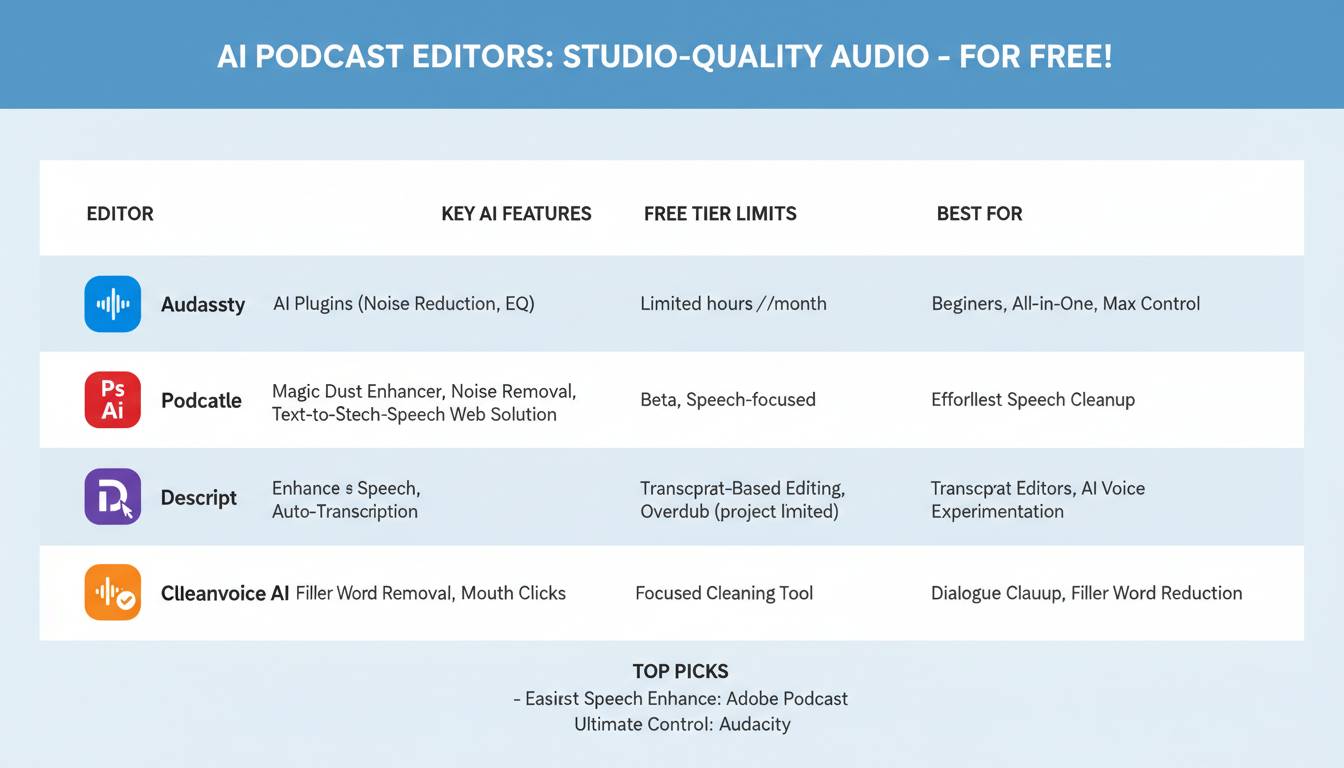
Descript has emerged as the industry leader in AI-powered audio editing, and its free tier remains remarkably capable for individual podcasters.
The platform’s standout feature is its transcript-based editing interface. Rather than manipulating waveforms, you edit audio by editing text—the software automatically transcribes your recording, and removing text removes the corresponding audio. This approach eliminates the steep learning curve traditionally associated with audio editing, making it accessible to complete beginners.
Free Tier Capabilities:
Descript’s free plan includes 3 hours of transcription per month, unlimited audio recording, basic noise reduction, filler word removal, and standard export formats. You can create episodes up to 3 hours in length, which covers most podcast formats.
What’s Missing from Free: The unlimited access to filler word removal and studio sound enhancement requires a paid subscription. The free tier also limits you to standard MP3 and WAV exports without the optimized podcast hosting integrations.
Best For: Beginners who prefer text-based editing, podcasters who need quick transcription, and creators who value the streamlined workflow Descript provides.
Podcastle: All-in-One Recording and Editing
Podcastle distinguishes itself by combining recording, editing, and hosting in a single platform. The free tier provides substantial functionality, making it particularly attractive for creators who want to minimize their tool stack.
The platform offers AI-powered noise removal, audio enhancement, and filler word detection. Its Magic Dust feature applies comprehensive processing to improve audio quality with a single click—a genuine time-saver for creators focused on content rather than technical refinement.
Free Tier Capabilities:
Podcastle’s free plan includes 2 hours of AI-powered editing per month, unlimited recording, basic transcriptions, and access to their royalty-free music library. The platform supports both solo and remote recording through its browser-based interface.
What’s Missing from Free: Advanced AI features like voice cloning, long-form transcription beyond 2 hours, and some export options require paid plans. However, the free tier handles typical podcast episodes effectively.
Best For: Creators who want an all-in-one solution, remote interview recording, and users who appreciate modern, intuitive interfaces.
Riverside: Remote Recording Excellence
Riverside specializes in remote podcast recording, offering local recording that captures audio directly on each participant’s device before uploading—a technical approach that produces significantly higher quality than traditional web-based recording that compresses audio during transmission.
The platform’s free tier includes 2 hours of recording per month, HD video and audio recording, and basic AI transcription. For podcasters conducting remote interviews, Riverside’s quality advantage is substantial, particularly when recording with guests who have varying internet connections.
Free Tier Capabilities:
Individual creators can record up to 2 hours monthly with full local recording quality. The free tier includes essential editing tools, automatic transcription, and the ability to export in standard formats.
What’s Missing from Free: Extended recording times, advanced editing features, and team collaboration tools require paid plans. The focus on remote recording means solo podcasters might find less value in this particular offering.
Best For: Podcasters who conduct remote interviews, interviewers who need guaranteed audio quality regardless of guest internet conditions, and creators who value video recording alongside audio.
Audacity with AI Plugins: Maximum Customization
Audacity, the long-standing open-source audio editor, doesn’t include native AI features, but the combination of this free software with community-developed AI plugins provides powerful capabilities for technical users willing to invest some setup time.
The key advantage here is customization. You can combine different plugins for noise reduction (like the RNA Noise Reduction preset), voice isolation, and audio restoration, building a personalized processing chain that precisely matches your needs. The downside is the learning curve—getting results requires understanding audio processing concepts and how different plugins interact.
Free Capabilities:
Audacity itself is completely free with no limitations. Adding AI capabilities requires installing separate plugins like Krisp (free tier available), Adobe Podcast Enhance (currently free during beta), or exploring community options like the newer AI-powered noise reduction tools.
Setup Requirements:
Installing and configuring plugins takes 30-60 minutes for first-time users. However, once configured, the workflow becomes straightforward.
Best For: Technical users who want complete control over their processing, creators who need specific capabilities that match particular recording challenges, and users who prefer offline editing without browser dependencies.
Cleanvoice AI: Specialized Filler Word Removal
Cleanvoice AI takes a focused approach, specializing specifically in removing filler words, mouth sounds, and dead air from recordings. Rather than offering comprehensive editing, it excels at one specific task—and does so exceptionally well.
The platform processes uploaded audio to identify and remove common issues: “um,” “uh,” “ah,” lip smacking, excessive pauses, and stuttering. This targeted approach makes it an excellent complement to other editors rather than a complete solution.
Free Tier Capabilities:
Cleanvoice offers a free trial providing 30 minutes of processing time—enough to test the service or handle several shorter episodes. No account required to begin processing.
How It Works:
Upload your edited audio, let the AI identify issues, review suggested edits in their interface, approve or adjust removals, and export the cleaned version. The processing typically takes minutes regardless of file length.
Best For: Podcasters who already have basic editing skills but struggle with post-production cleanup, creators who want a quick polish pass on otherwise finished episodes, and those who find filler words particularly distracting in their recordings.
Comparative Analysis: Feature-by-Feature Breakdown
| Feature | Descript | Podcastle | Riverside | Audacity + Plugins | Cleanvoice |
|---|---|---|---|---|---|
| Noise Reduction | ✅ Basic (Free) | ✅ Advanced (Free) | ✅ Included | ✅ Via Plugins | ❌ Not Primary |
| Filler Word Removal | ✅ Basic (Free) | ✅ Included | ❌ Limited | ✅ Via Plugins | ✅ Primary Feature |
| Transcription | ✅ 3 hrs/month | ✅ Limited | ✅ Included | ❌ Manual | ❌ No |
| Remote Recording | ✅ Via Integration | ✅ Native | ✅ Best-in-Class | ❌ No | ❌ No |
| Learning Curve | ✅ Low | ✅ Low | ✅ Low | ❌ High | ✅ Very Low |
| Export Quality | ✅ Good | ✅ Good | ✅ Excellent | ✅ Excellent | ✅ Good |
| Monthly Free Limit | 3 hrs editing | 2 hrs editing | 2 hrs recording | Unlimited | 30 min trial |
How to Choose the Right Tool for Your Workflow
Selecting the best free AI podcast editor depends primarily on your specific workflow, technical comfort level, and production format. Consider these decision factors:
If you’re entirely new to podcasting, Descript or Podcastle provide the gentlest learning curves. Their graphical interfaces and AI-assisted processing mean you can achieve decent results immediately. Descript’s text-based editing particularly appeals to creators who find waveform manipulation intuitive.
If you conduct remote interviews regularly, Riverside’s local recording technology provides meaningfully better audio than browser-based alternatives. The free tier’s 2 hours monthly handles most interview podcast formats, and the quality improvement over competing services justifies the platform-specific commitment.
If you already have basic editing skills but want faster cleanup, Cleanvoice AI addresses a specific pain point efficiently. Using it alongside Audacity or your preferred editor creates a streamlined two-step workflow: edit first, then polish with Cleanvoice.
If you value maximum control and don’t mind the learning curve, Audacity with AI plugins offers the greatest flexibility. Once configured, this combination handles any audio challenge without subscription costs or usage limitations.
Implementation Guide: Getting Started
Starting with any of these tools requires minimal technical investment. Here’s a practical workflow to evaluate options:
First Session Setup:
Begin with Descript or Podcastle—both offer browser-based access with minimal installation. Create an account, record a test segment using your existing microphone, and apply the automatic enhancement features. Compare the results against your current unprocessed audio to assess improvement.
Testing Remote Recording:
If your podcast involves interviews, test Riverside’s free tier with a conversation partner. Record the same interview using your current method and compare audio quality, particularly focusing on moments with unstable internet connections.
Evaluating Processing Power:
For existing recordings with noise or filler words, upload a 10-minute segment to Cleanvoice’s free trial. Note the accuracy of detection and whether the automated removal sounds natural. This quick test reveals whether the specialized tool provides enough value to incorporate into your workflow.
Common Mistakes When Using Free AI Editors
Understanding typical pitfalls helps you avoid wasted time and frustration:
Expecting Magic: AI tools significantly improve audio quality, but they don’t eliminate the need for reasonable source recordings. Recording in a closet full of clothes produces better results than a reverberant living room—AI enhances decent audio, but cannot replace proper recording technique entirely.
Ignoring the Learning Curve Despite Low Barriers: Even user-friendly tools require experimentation to achieve optimal results. Budget time to learn interface quirks and discover which settings work best for your specific voice and recording environment.
Over-Relying on One Tool: Many creators find that combining tools produces superior results. A typical optimized workflow might use Riverside for remote recording, Descript for initial editing and transcription, and Cleanvoice for final polish.
Neglecting Export Settings: Different platforms have different loudness standards. YouTube favors loudness normalized to -14 LUFS; podcast directories typically use -16 LUFS. Check your export settings match your distribution requirements.
Frequently Asked Questions
Can free AI podcast editors match professional audio quality?
Free AI editors produce broadcast-quality audio for most podcast formats. Professional results depend more on recording conditions and microphone quality than editing software. A $50 microphone recorded cleanly typically outperforms a $500 microphone with poor recording conditions that AI then tries to repair. For typical podcast workflows, free tools handle 95% of professional requirements effectively.
Do I need to install software, or can I use browser-based editors?
Most AI podcast editors offer browser-based versions—Descript, Podcastle, and Riverside all function entirely online. Browser-based tools require stable internet connections but provide cross-platform compatibility. Audacity requires installation but works offline. Choose based on your internet reliability and preference for installed versus web applications.
How long can my recordings be with free tiers?
Limits vary by platform. Descript’s free tier allows episodes up to 3 hours. Podcastle and Riverside both provide approximately 2 hours of monthly recording or editing on free plans. For most podcast episodes, these limits accommodate standard formats. If you regularly produce extended content, consider which platform’s limits align with your typical episode length.
Can I use these tools for commercial podcasting?
Yes—free tiers of all tools mentioned support commercial use. Review each platform’s specific terms of service, particularly regarding royalty-free music libraries and transcription usage rights. Most allow commercial podcasting on free plans, though attribution requirements vary.
Which tool is best for removing background noise from recordings made in noisy environments?
Riverside provides the most reliable solution by recording locally before upload, preventing compression artifacts from internet transmission that compound noise issues. For existing recordings, Descript and Podcastle both offer effective noise reduction on free tiers. Very noisy recordings may require the enhanced noise removal features in paid tiers or combining tools like Audacity with specialized noise reduction plugins.
Do I need to credit AI tools in my podcast?
No standard requirement exists to credit AI editing tools in podcast descriptions or episodes. Unlike music licensing, AI audio enhancement tools typically don’t require attribution. However, if you use transcription services, review whether attribution requirements apply to generated transcripts—some platforms include minor attribution requirements in their free tier terms.
Final Recommendations
The best free AI podcast editor ultimately depends on your specific situation. For most creators beginning their podcasting journey, Descript provides the most accessible entry point with its revolutionary text-based editing approach. Podcasters focused on remote interviews will find Riverside’s local recording technology delivers meaningful quality improvements. Technical users seeking complete control should invest time in Audacity with AI plugins.
The landscape continues evolving rapidly—AI capabilities expand monthly, and platforms regularly enhance free tiers to attract new users. The tools available today represent capabilities that required thousands of dollars and professional training just five years ago. Take advantage of free tiers to test multiple options, find the workflow that matches your preferences, and start producing professional-quality episodes without initial investment.